griasdi Hello, you. Your crew is waiting.

Voice and chat for your crew, encrypted on your device. Crisp voice for long nights, screen sharing, big files, and a server in the middle that only ever hears noise.

The beta is open. Come say griasdi in our Hub.

gree·ahs·dee, Bavarian for “hello, you”.

Tap someone to make them talk. Watch what the server gets.

Sounds like you’re in the same room.

A voice engine built for long sessions: echo cancellation, automatic gain, a noise model that eats your mechanical keyboard, and a jitter buffer for every speaker. Push-to-talk, speech detection or voice activation, your call.

Noise suppression

Light: a small speech model, about 10 ms of delay. The default.

How your voice travels On your device the microphone signal is cleaned up, its noise removed by a model, gated by speech detection, encoded with Opus and encrypted with SFrame. The server only forwards ciphertext. On each listener's device it is decrypted, buffered against jitter, mixed and played. your device their device mic AECecho, gain noise model speech gate Opus+ SFrame xx xxserverciphertext only decrypt 40–200jitter bufferms, per speaker mix, volume ±10dB per person headset 48 kHz · 10 ms blocks · 20 ms Opus frames with forward error correction AES-GCM keys from MLS How your voice travels your device their device mic AECecho, gain noise model speech gate Opus + SFrame xx xxserverciphertext only decrypt 40–200jitter buffer per speaker mix, volume ±10dB per person headset 48 kHz · 20 ms Opus frames
  • Push-to-talk or speech detection that ignores your keyboard.
  • Mute for me and a volume per person, kept across every channel.
  • Cues you choose: tones, noises, birds, spoken words or your own set. They never go into the call.

Everything your crew does on a Saturday night.

Text channels, voice channels, calls and direct messages in one app. All of it encrypted, all of it fast.

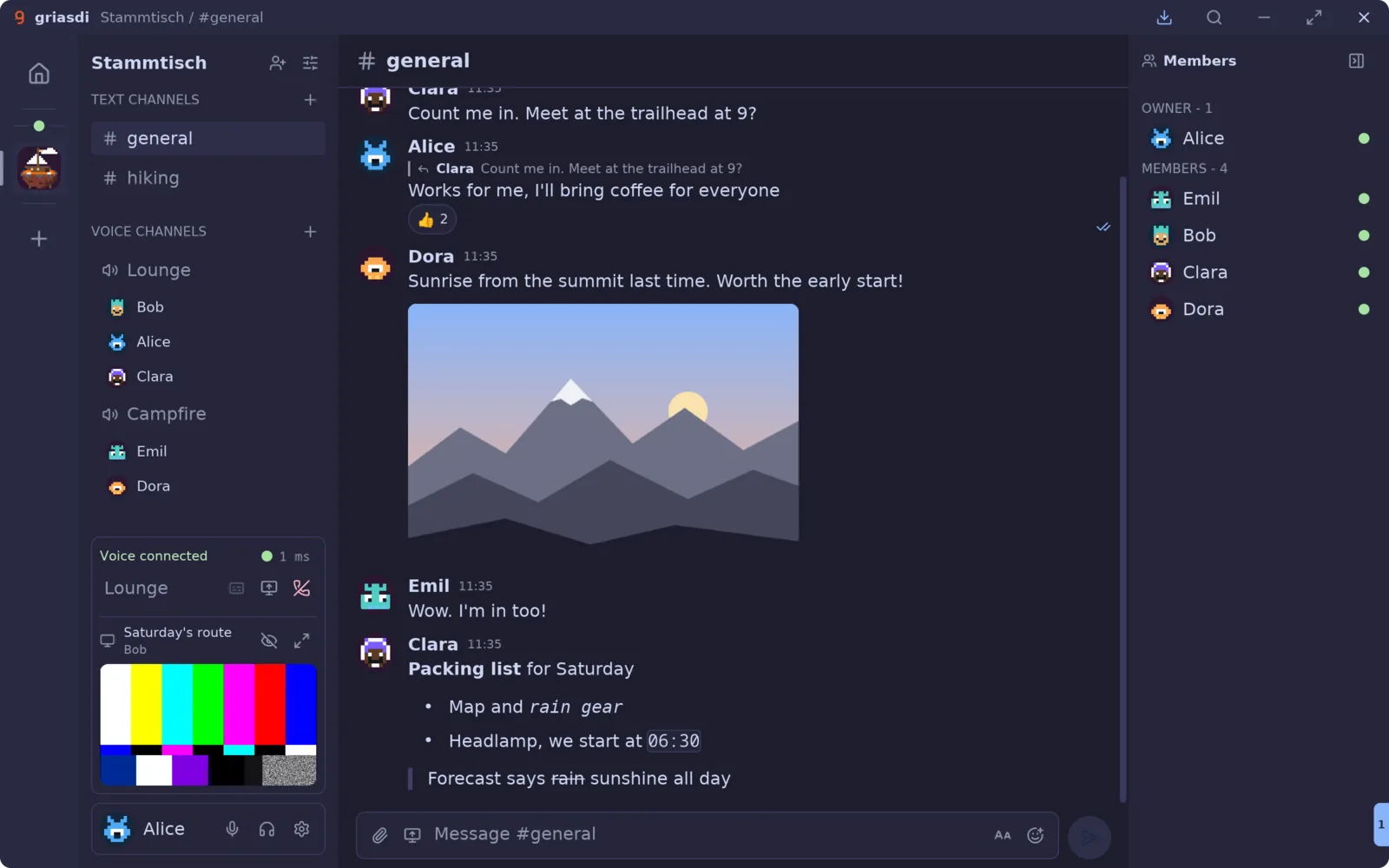
The griasdi app: a community called Stammtisch with people in two voice channels and a live screen share in the call panel, a conversation in #general with a reply, reactions, a photo and Markdown, and the member list. See who’s in before you join Screen share with sound, in AV1 Replies, reactions, Markdown A face for everyone
The app with a demo community.
  • Text channels and DMs

    Markdown, replies, reactions, mentions and @here. Edit your last message with the up arrow.

  • Voice channels and calls

    Hop in and out of voice rooms, or call someone directly. Moderators can mute for everyone.

  • Screen sharing

    A screen, a window, a capture card or a camera, with its sound. Into the call or into a channel.

  • Files of any size

    Too big for the server? It goes from member to member in 1 MiB pieces, each one checked, from everyone who has it.

  • Watch together

    Videos play right in the chat, even while they are still arriving. YouTube included.

  • Roles that hold

    Ranked roles, private channels, owners. Every change is signed and checked by every member.

  • Updates itself

    New builds install on their own. A restart keeps your place, your call and your screen share.

  • Keyboard first

    Ctrl+K opens the command palette. Everything else has a key too.

No accounts. Just keys.

You are a key pair on your device, not a username with a password reset. Text is encrypted with MLS (RFC 9420), voice and screens with SFrame (RFC 9605), all over QUIC. Servers order, store and forward ciphertext. That is all they can do.

  • Join with a link. No sign-up, no e-mail, no phone number.
  • Each device holds its own key, certified by yours.
  • New members and devices get the keys to read history from the others, not from the server.
# general
  1. Aliceraid at 9? bring snacks
  2. Claraonly if Emil fixes his mic first
  3. Emilit was the noise model. it’s ON now
  4. Bobgriasdi everyone, server password is… just kidding, there isn’t one

A face for everyone. No picture? You get a pixel face drawn from your id. Don’t like it? Roll again.

Smart where you sit. Not on a server.

griasdi runs its models on your own computer, on its own inference engine. What you say is never sent anywhere to be analysed.

  • Noise suppression

    Three strengths, from “quiet room” to “someone is drilling next door”. On the processor, in real time.

  • Speech detection

    Your microphone opens when you speak, not when you type, chew or breathe heavily into a boss fight.

  • Live transcripts

    Opt in, and your graphics card writes along. Captions are posted encrypted to the channel, and call transcripts vanish when the call ends.

  • Spoken cues

    A voice that says who joined, by name, in ten voices. Opt in, runs locally.

  • Numbers, not promises

    Every model has a Details view. The two on your microphone show their median and slowest 1 % for every second, and noise suppression falls back to the standard one if it gets too slow.

Hackable from your side.

For people who live in a terminal. Everything stays on your machine and is off until you turn it on in Settings, Developer.

MCP server for your agents

Let an AI agent list your conversations, read and send messages as you, and read the live transcript of your call. Listens on 127.0.0.1 only, refuses browsers, every request needs your token. The plug in the title bar hands you the configuration:

{
  "mcpServers": {
    "griasdi": {
      "type": "http",
      "url": "http://127.0.0.1:13337/mcp",
      "headers": { "Authorization": "Bearer …" }
    }
  }
}
  • list_conversations
  • read_messages
  • send_message
  • read_transcript

Add a device over SSH

Bring your laptop in from a terminal: your desktop signs its key, your communities follow.

$ griasdi link ssh desktop
passphrase for the user key: ••••••
linked · 2 servers added

Grab it. Say griasdi.

One app for Linux, Windows and macOS. Invite your crew with a link.

Windows

x86_64. Installs per user, no administrator rights needed.

Not code-signed yet. If Windows says “Windows protected your PC”, click More info, then Run anyway.

macOS

Apple Silicon, macOS 14 or newer.

Not notarized yet. If macOS says it cannot check griasdi, open System Settings, then Privacy & Security, and click Open Anyway next to griasdi.

Every file's SHA-256 is in the build's signed manifest.

The beta is open.

Install griasdi, then open the invite to join the griasdi Hub, our community for the beta.

Join the griasdi Hub